Running a small business is not easy. You need to manage customers, create marketing content,promote products, handle daily operations, and find new ways to grow.
But what if you could make some of these tasks easier without spending money on expensive software?
That’s where free AI tools can help.
Today, small business owners can use artificial intelligence to create social media posts, design marketing materials, research competitors, plan campaigns, and edit videos.
The challenge is knowing which tools are worth your time.
You don’t need ten different AI subscriptions to grow your business. You need a few useful tools that solve real problems.
In this guide, we’ll explore five of the best free AI tools for small business owners in 2026, how to use them, and when it makes sense to upgrade.
Why Small Businesses Should Start With Free AI Tools
Many business owners make the same mistake.
They discover a new AI tool, see its impressive features, and immediately purchase a subscription.
A few weeks later, they realize they are barely using it.
The problem isn’t necessarily the software. It’s that they paid before identifying a clear business need.
Starting with a free plan helps you:
Test AI without a large budget.
Identify repetitive tasks that AI can simplify.
Improve marketing and content creation.
Understand whether a tool fits your daily workflow.
Avoid paying for features you don’t need.
For example, imagine you spend three hours every week writing social media captions.
A free AI writing tool might help you prepare initial drafts in less time.
If the results are useful, you can continue using the free version until its limitations become a genuine problem.
The goal is simple: prove the value first, then decide whether to invest.
5 Best Free AI Tools for Small Business Owners
1. ChatGPT: Best for Content Creation and Business Ideas
ChatGPT is a useful starting point for small business owners who want help with writing, planning, and everyday business communication.
You don’t need technical knowledge to begin.
Simply describe what you want to achieve and provide enough context about your business.
What can you do with ChatGPT?
Write social media captions.
Generate blog post outlines.
Draft customer email responses.
Create product descriptions.
Brainstorm promotional campaigns.
Prepare frequently asked questions.
Practical example:
Suppose you own a small clothing store and want to promote a new collection.
Instead of spending hours thinking about captions, you can ask ChatGPT:
“Create five simple Instagram captions for a small clothing store promoting a new summer collection. Use a friendly tone and include a clear call to action.”
Review the suggestions, adjust the language to match your brand, and publish the best versions.
Free plan consideration:
ChatGPT offers a free tier with usage and feature limits. These can change, so check the current plan before depending on it for regular business operations.
When should you upgrade?
Consider upgrading when you use ChatGPT consistently for valuable work and the free plan’s limits regularly interrupt that work.
2. Canva: Best for Social Media Graphics and Marketing Designs
Good design helps a small business look professional online.
But hiring a designer for every Instagram post, promotional banner, or marketing flyer may not fit your budget.
Canva makes basic design work easier.
Its free plan includes templates and design tools, while selected AI features may have separate usage restrictions.
What can you create with Canva?
Instagram and Facebook posts.
Promotional banners.
Business presentations.
Product announcements.
Marketing flyers.
Simple video graphics.
Practical example:
Imagine you run a local bakery.
You want to promote a weekend cake offer.
Open Canva, select a suitable Instagram template, add a product photograph, update the price and offer details, and export the design.
You can reuse the same visual style for future promotions.
This saves time and keeps your brand presentation consistent.
Free plan consideration:
Some templates, stock assets, brand features, and AI capabilities require a paid plan.
When should you upgrade?
Upgrade when premium assets or features are genuinely necessary for your regular design work, not simply because they are available.
3. Google Gemini: Best for Marketing Planning and Brainstorming
Small business marketing requires more than attractive posts.
You also need fresh ideas, organized campaigns, and an understanding of what your customers care about.
Google Gemini can help you brainstorm and structure marketing activities.
What can you use Gemini for?
Generate content ideas.
Plan marketing campaigns.
Brainstorm seasonal promotions.
Organize business information.
Draft marketing messages.
Create simple content calendars.
Practical example:
Suppose you operate a small fitness studio.
You want to attract more customers through Instagram.
You could ask Gemini:
“Create a 30-day Instagram content calendar for a small fitness studio targeting beginners. Include educational posts, customer questions, workout tips, and promotional ideas.”
You can then select the most relevant suggestions and turn them into actual posts.
This gives you a starting plan without paying for a separate marketing planning platform.
Free plan consideration:
Gemini has free access options, but availability, model access, and usage limits may vary.
When should you upgrade?
Consider a paid option only when you have a specific need that the free version cannot meet.
4. Perplexity: Best for Business Research With Sources
Making business decisions requires reliable information.
Whether you’re researching competitors, exploring customer interests, or studying marketing trends, good research can help you make better decisions.
Perplexity is an AI-powered search and research tool that provides answers alongside source links.
What can you research?
Industry developments.
Customer questions.
Competitor positioning.
Marketing trends.
Product category information.
Potential business opportunities.
Practical example:
Imagine you sell handmade skincare products.
You want to understand the questions customers commonly ask before buying natural skincare products.
You could search:
“What questions do customers ask before purchasing handmade skincare products? Include reliable sources.”
Use the findings to create educational content, improve product descriptions, or build an FAQ section.
Important:
AI-generated research can contain mistakes or outdated information.
Always check the original sources before making pricing, financial, legal, or other important business decisions.
Free plan consideration:
Perplexity offers free search functionality, with restrictions on certain advanced capabilities.
When should you upgrade?
Upgrade only when more advanced research features provide measurable value to your business.
5. CapCut: Best for Short-Form Video Editing
Video content can help small businesses demonstrate products, explain services, and connect with potential customers.
But creating videos doesn’t always require expensive editing software.
CapCut provides accessible video editing tools, with some AI-powered capabilities depending on the plan and platform.
What can you create?
Instagram Reels.
Short promotional videos.
Product demonstrations.
Customer testimonial videos.
Simple educational clips.
Behind-the-scenes content.
Practical example:
Suppose you run a small restaurant.
Record a short video showing how your most popular dish is prepared.
Use CapCut to trim unnecessary footage, add readable text, include suitable audio, and export a short promotional video.
You now have content that can be shared across your social media channels.
Free plan consideration:
CapCut’s free features and availability can differ by region, device, and platform. Some templates, effects, and AI features require payment.
When should you upgrade?
Consider upgrading when a paid editing feature consistently saves production time or improves content you already publish regularly.
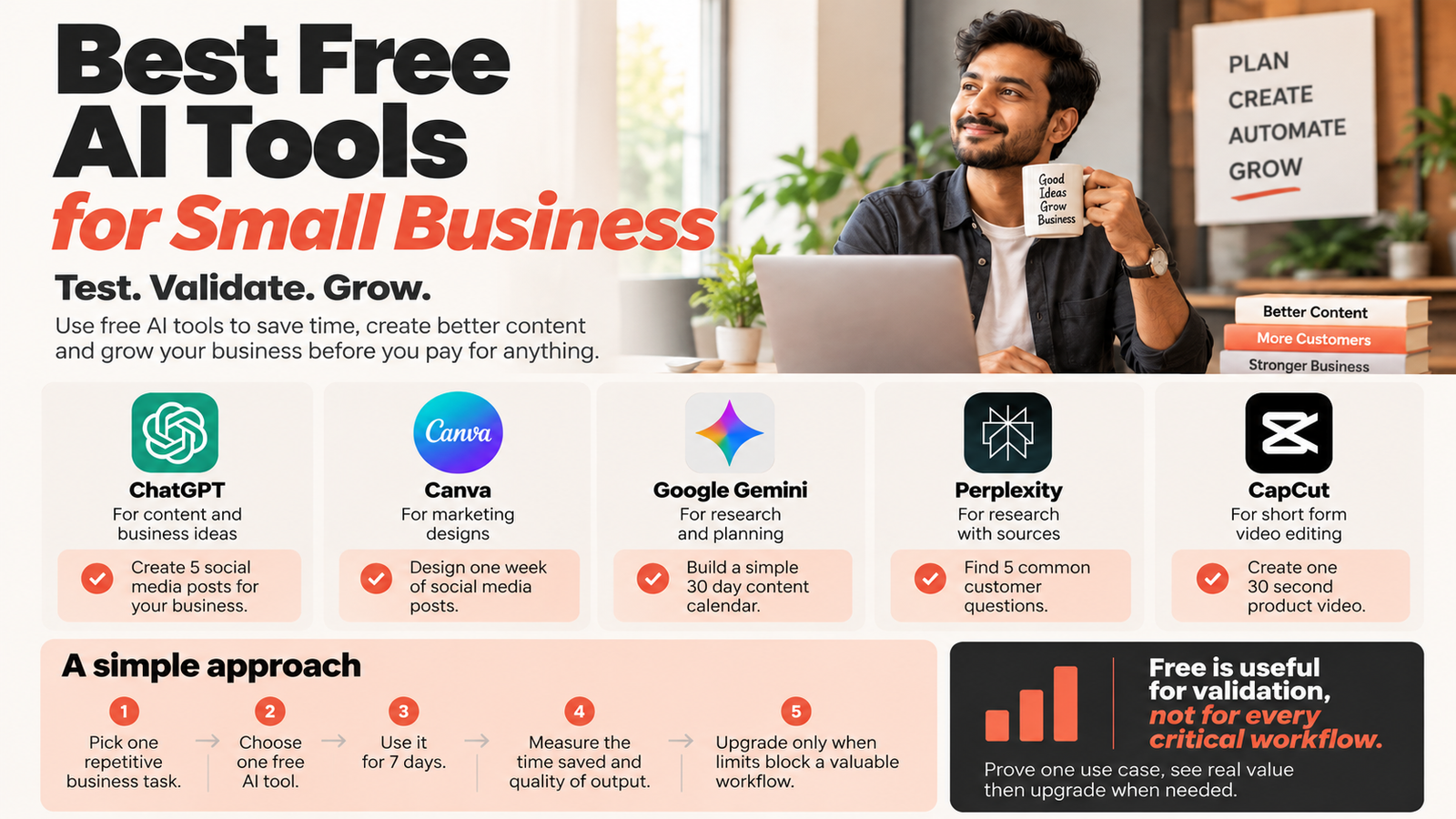
Quick Comparison of Free AI Tools for Small Business
| AI Tool | Best For | Simple First Test |
|---|---|---|
| ChatGPT | Writing and ideas | Create 5 social media captions |
| Canva | Marketing design | Design 5 branded graphics |
| Google Gemini | Planning | Build a 30-day content calendar |
| Perplexity | Research | Find 5 customer questions |
| CapCut | Video editing | Create one short product video |
Each tool solves a different problem.
You don’t need to start using all five immediately.
Choose the one that addresses your biggest challenge today.
How to Test Free AI Tools Before Spending Money
Trying AI tools randomly is not an effective business strategy.
A better approach is to run a simple seven-day experiment.
Step 1: Identify One Repetitive Task
Start with something that consumes your time every week.
For example:
Writing captions.
Creating promotional graphics.
Answering common customer questions.
Planning marketing content.
Editing short videos.
Choose one task rather than attempting to automate your entire business.
Step 2: Select One Free AI Tool
Match the tool to the task.
If writing takes too long, test ChatGPT.
If designing graphics is your challenge, try Canva.
If you struggle with content planning, explore Gemini.
Keep the experiment focused.
Step 3: Use the Tool for Seven Days
Use it for actual business tasks rather than just exploring features.
For example, create your upcoming week’s marketing content.
Pay attention to how much time you spend generating, reviewing, and correcting the output.
Step 4: Measure the Results
Ask yourself:
Did the tool save time?
Was the output useful?
How much editing was required?
Could I repeat this process every week?
Did the tool create new problems?
Suppose writing five captions normally takes 90 minutes.
With AI assistance, you complete the same task in 40 minutes, including review and editing.
That represents 50 minutes saved on that task.
The important point is to measure actual results, not assume AI is automatically faster.
Step 5: Decide Whether a Paid Plan Is Necessary
After seven days, review your experience.
If the free version meets your needs, continue using it.
If usage restrictions repeatedly interrupt valuable work, compare the paid plan with the time or money it could save.
Don’t upgrade simply because a tool advertises more features.
Upgrade because your business has a clear reason.
When Should a Small Business Pay for AI Tools?
A paid AI subscription can be a worthwhile investment.
But timing matters.
Consider upgrading when:
You use the tool consistently.
It solves a meaningful business problem.
You can measure time saved or improvements in output.
The free plan prevents you from completing important tasks.
The paid features justify their cost.
For example, imagine an AI tool costs ₹2,000 per month.
If upgrading saves five hours of useful work each month, and you value that time at ₹500 per hour, the potential time value is ₹2,500.
That may justify the subscription.
However, time savings alone do not guarantee additional revenue. You still need to consider accuracy, review effort, and whether those saved hours can be used productively.
Common Mistakes Small Businesses Make With Free AI Tools
Trying Too Many Tools at Once
Testing ten tools simultaneously makes it difficult to understand which one actually helps.
Start with one tool and one business problem.
Publishing AI Content Without Reviewing It
AI-generated text can sound generic or contain incorrect details.
Before publishing, check the facts, adjust the tone, and add your own business experience.
Sharing Sensitive Business Information
Avoid entering confidential customer records, passwords, financial information, or private business documents without understanding the tool’s privacy and data-handling policies.
Expecting AI to Replace Business Judgment
AI can assist with writing, planning, research, and production.
It cannot automatically understand your customers, guarantee sales, or make every business decision correctly.
Use it as an assistant, not as a replacement for human judgment.
Paying Before Measuring Results
An AI subscription should support a useful workflow.
If you cannot explain how a tool helps your business, you probably don’t need to pay for it yet.
Can Free AI Tools Really Help a Small Business Grow Online?
Yes, they can support online growth when used for the right tasks.
For example, a small business could use:
ChatGPT to prepare social media captions.
Canva to create branded graphics.
Gemini to organize a monthly content plan.
Perplexity to research customer questions.
CapCut to edit product videos.
Together, these tools can make marketing activities easier to manage.
But growth still depends on understanding your audience, offering valuable products or services, communicating clearly, and consistently improving your marketing.
AI helps you execute tasks. It does not replace a sound business strategy.
Frequently Asked Questions
What are the best free AI tools for small business?
ChatGPT, Canva, Google Gemini, Perplexity, and CapCut are useful options to explore. They support different tasks, including content writing, graphic design, marketing planning, research, and video editing.
Can I use AI for my small business without paying?
Yes. Several AI platforms offer free plans or free features. However, usage limits, commercial-use terms, and feature availability differ. Review the relevant terms before using a tool for business purposes.
Which free AI tool is best for digital marketing?
It depends on the task. ChatGPT can help with writing, Canva with graphics, Gemini with planning, Perplexity with research, and CapCut with video editing.
Should I pay for ChatGPT or other AI tools immediately?
Not necessarily. Start with a free version, test one useful workflow, and measure the results. Consider paying only when the additional features solve a real limitation.
Are free AI tools safe for business use?
They can be useful, but you should review their privacy policies, data practices, and commercial-use terms. Avoid sharing sensitive information without appropriate safeguards, and verify important outputs.
Final Thoughts: Start Free, Prove Value, Then Upgrade
The best free AI tools for small business are not necessarily the ones with the most features.
They are the ones that help you solve real problems.
You don’t need a large software budget to start exploring AI.
You need a clear task, a suitable tool, and a practical way to measure the results.
Start with one free plan.
Test it for seven days.
Measure the time saved and the quality of work.
Continue using it if it delivers value.
Upgrade only when the free plan’s limitations hold back a workflow that genuinely benefits your business.
Remember, the goal isn’t to collect AI subscriptions.
The goal is to use technology wisely, reduce unnecessary work, and build a stronger business.
Your Next Step
Choose one task that takes too much time in your business.
Pick one free AI tool from this list and test it this week.
Which AI tool are you planning to try first?
Share your experience or questions in the comments.
Author: Kishor Nair
AI Digital Marketing