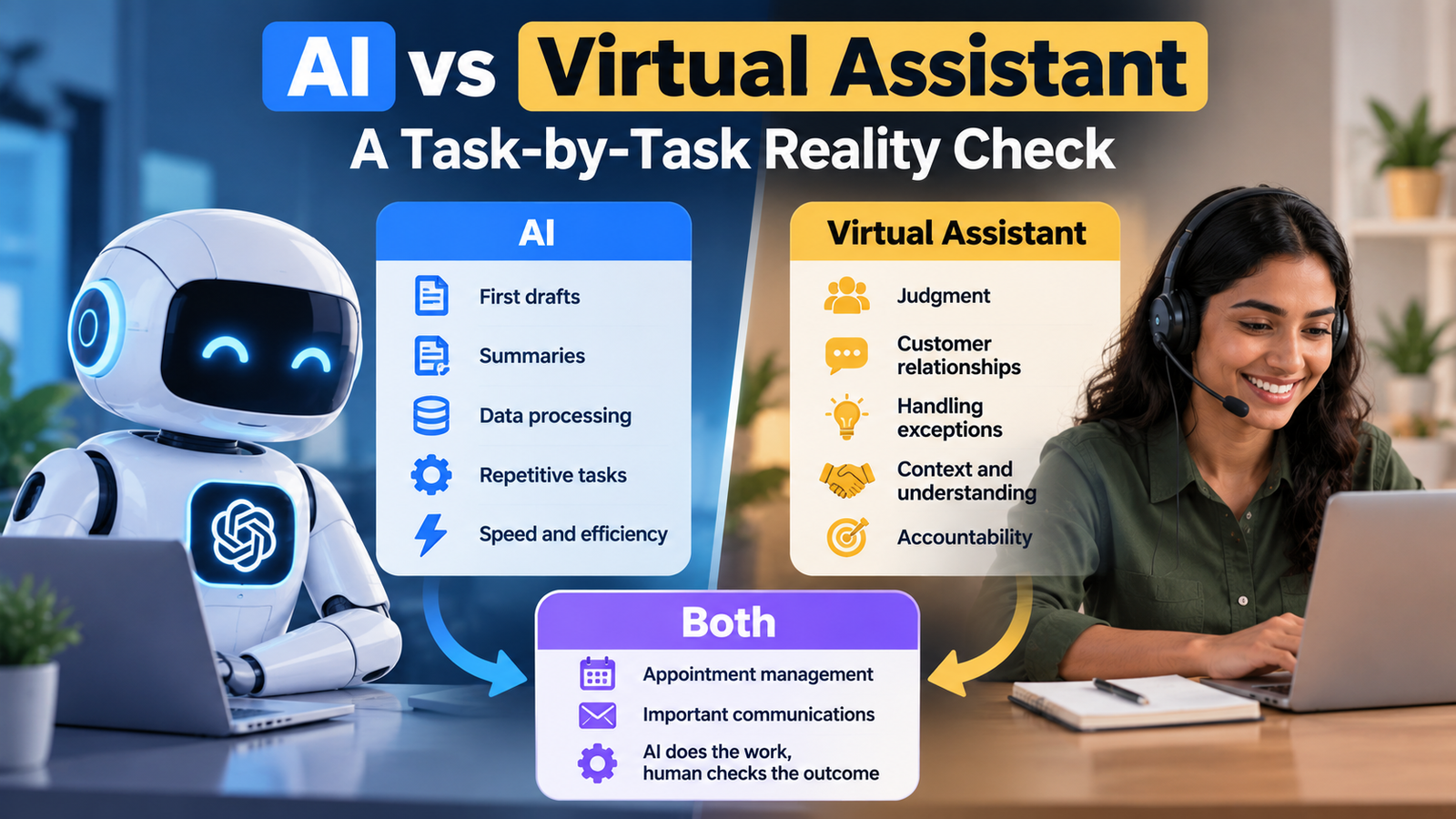
Don’t ask whether AI can replace your virtual assistant.
Ask which tasks should never reach your VA in the first place.
If a task is repetitive, predictable, and low-risk, AI can often handle the first pass.
If it requires judgment, relationships, context, or dealing with something unexpected, a person should probably own it.
And many business tasks need both.
That’s the practical way to think about AI versus virtual assistant support.
For small business owners, the decision shouldn’t be:
“Should I use AI or hire a VA?”
A better question is:
“Which tasks should AI handle, which need a person, and where should they work together?”
Let’s break it down.
AI vs Virtual Assistant: It’s Not an Either/Or Decision
AI and virtual assistants solve different types of problems.
AI is particularly useful when you need speed and repetition.
A virtual assistant is valuable when you need judgment and accountability.
The confusion starts when we treat them as interchangeable.
Consider something as simple as managing your inbox.
AI can:
Categorize incoming emails
Summarize long messages
Identify possible priorities
Draft replies
Extract action items
But imagine an important client sends this:
“We’re disappointed with what happened yesterday. Can we speak before we decide how to proceed?”
AI can summarize the email.
It can even produce an excellent draft response.
But should AI independently decide how your business handles an unhappy, high-value customer?
Probably not.
That’s where human judgment matters.
The best setup may therefore be:
AI identifies and summarizes the issue → VA reviews the context → Business owner gets involved when necessary.
AI and people aren’t necessarily competitors.
They can be different parts of the same workflow.
When Should You Use AI?
Start by looking for tasks that are:
Repetitive + predictable + relatively low-risk.
These are usually strong candidates for AI assistance.
1. First Drafts
Suppose your business regularly sends similar follow-up emails.
Instead of asking your VA to write every message from scratch, AI can create the initial draft.
Your VA can then review or personalize it when necessary.
This changes the human role from:
Create everything manually
to:
Review, improve, and handle exceptions.
That’s a much better use of people’s time.
2. Summaries
AI is useful when someone has to read information primarily to extract the important points.
For example:
A meeting finishes.
Instead of your VA spending 20 minutes turning notes into a summary, AI can create:
Key discussion points
Decisions
Action items
Deadlines
Follow-up questions
Your VA can check the result and make sure the actions actually happen.
AI processes the information.
The person owns the outcome.
3. Data Processing and Categorization
Imagine receiving 50 enquiries through a website form.
Someone might currently read each enquiry and manually categorize it as:
Sales
Support
Partnership
General enquiry
If the categories and rules are reasonably clear, AI may be able to perform the first classification.
Your team only needs to review uncertain cases.
4. Repetitive Administrative Work
Other potential AI tasks include:
Extracting information from documents
Preparing routine reports
Organizing information
Drafting standard responses
Turning notes into structured records
Identifying information that needs attention
The important point is not to automate every administrative task.
It’s to remove repetitive work where the cost of an occasional mistake can be safely managed.
When Should You Use a Virtual Assistant?
Now look at the opposite category.
Tasks involving judgment, relationships, exceptions, and accountability generally need more human involvement.
1. Customer Relationships
AI can help draft customer communication.
But communication isn’t always just about producing grammatically correct sentences.
A good VA may understand:
How important a customer is
What happened in previous conversations
When the customer sounds frustrated
When a request is unusual
When the business owner should become involved
That’s context.
And context becomes especially important when the relationship matters.
2. Handling Exceptions
Automation works well when things happen as expected.
Business doesn’t always work that way.
Imagine your scheduling system normally offers customers available appointment slots.
Then a long-term customer says:
“I know you’re fully booked, but I’m only in town tomorrow. Is there any chance Kishor could fit me in?”
AI can identify that this is an unusual request.
But a VA may need to:
Check the schedule.
Understand the customer’s importance.
Speak to the business owner.
Move another internal commitment.
Then communicate the decision appropriately.
That’s not simply scheduling.
It’s exception handling.
3. Tasks Requiring Judgment
Some tasks technically can be performed by AI but still shouldn’t be completely delegated to it.
Examples might include:
Responding to sensitive complaints
Deciding which client needs immediate attention
Handling unusual refund requests
Managing important stakeholder communication
Making commitments on behalf of the business
The more consequences a decision has, the more important human review becomes.
When Should You Use Both AI and a VA?
This is where many small businesses have the biggest opportunity.
Instead of asking:
AI or VA?
Design workflows where each handles the part they’re suited for.
Consider appointment management.
AI might handle:
Appointment request → Check availability → Suggest times → Send confirmation → Send reminder
Your VA handles:
Schedule conflict → Important client request → Cancellation exception → Owner availability change
Or consider lead management.
AI might:
Read enquiry → Extract details → Categorize lead → Draft response → Update CRM
Your VA might:
Review high-value leads → Personalize important communication → Handle unusual requests → Make sure follow-up happens
The combination can be more useful than expecting either AI or a person to do everything.
Use These 3 Questions to Decide
When deciding between AI versus virtual assistant, evaluate the task using three filters.
1. Risk: What Happens If This Goes Wrong?
This is one of the most important questions.
If AI incorrectly categorizes an internal document, the consequence might be minor.
If AI sends the wrong response to an angry customer, the consequence could be much greater.
The higher the risk, the stronger the case for human review.
Ask:
“If this task goes wrong, what does it cost us?”
That cost could involve:
Money
Customer trust
Reputation
Time
Compliance
Lost opportunities
Don’t evaluate automation only by how much time it saves.
Evaluate the cost of getting it wrong.
2. Context: Does the Task Require Understanding the Situation?
AI performs well when instructions and inputs are clear.
But some tasks require understanding information that isn’t neatly contained in a prompt or system.
Your VA might know:
“That customer always asks for a discount, but they’ve been with us for five years.”
“This lead was referred by our biggest client.”
“The owner doesn’t take meetings on Friday afternoons unless they’re urgent.”
“That email sounds routine, but this account has an unresolved problem.”
These details can completely change the appropriate action.
When context heavily influences the decision, human involvement becomes more valuable.
3. Accountability: Who Owns the Outcome?
This question is often overlooked.
Imagine AI drafts a customer response.
Who checks it?
Imagine an automation identifies a high-value lead.
Who makes sure somebody follows up?
Imagine an AI assistant notices a scheduling conflict.
Who is responsible for resolving it?
Automation doesn’t eliminate ownership.
Someone still needs to be accountable for the result.
If you cannot clearly answer:
“Who owns this?”
then the workflow probably isn’t ready to run without human oversight.
A Simple AI vs VA Decision Guide
You don’t need a complicated framework.
Start here:
Low risk + repetitive + predictable
Use AI first.
Examples:
Routine summaries
First drafts
Basic categorization
Information extraction
Repetitive administrative processing
High context + judgment + relationships
Use a person.
Examples:
Sensitive customer communication
Complex scheduling
Important client relationships
Unusual requests
Business decisions
Repetitive work + meaningful consequences
Use AI + human review.
Examples:
Lead qualification
Customer email drafting
Appointment management
Important document processing
CRM updates based on customer conversations
AI does the repetitive work.
A person checks the outcome and handles exceptions.
Don’t Pay People to Behave Like Software
There is another side to this conversation.
Small business owners sometimes hire a VA and then give them hours of work such as:
Copy this information.
Paste it here.
Summarize this.
Rename these records.
Categorize these enquiries.
Create the same report every Friday.
Send these standard reminders.
Much of that person’s time may be spent behaving like software.
That doesn’t necessarily mean you should remove the VA.
It means you should redesign their role.
Use AI and automation to remove repetitive work.
Then let your VA spend more time on activities requiring:
Judgment.
Coordination.
Communication.
Problem solving.
Relationships.
Accountability.
That can make the human role more valuable, not less.
Don’t Expect AI to Behave Like a Person Either
The opposite mistake is equally important.
A well-written AI response can create the impression that the system understands a business situation in the same way an experienced person does.
Those are not necessarily the same thing.
Generating a polished response isn’t the same as deciding whether that response should be sent.
Summarizing a complaint isn’t the same as owning the customer relationship.
Identifying a scheduling conflict isn’t the same as deciding which commitment should move.
Efficiency and responsibility are different things.
Your workflow should reflect that difference.
Start With Tasks, Not Job Titles
If you’re currently wondering whether to use AI or hire a virtual assistant, don’t start by comparing:
AI vs VA.
Take the work your business needs to complete and break it into individual tasks.
Then ask:
Is it repetitive?
Is it predictable?
What happens if it goes wrong?
How much context does it require?
Does it involve an important relationship?
Who should be accountable for the result?
You may discover that some tasks can go almost entirely to AI.
Some clearly need your VA.
And many work best when AI handles the repetitive first step and a person owns the final outcome.
The Goal Is the Right Division of Work
The future of small business operations doesn’t have to be humans versus AI.
A more useful model is:
AI for speed.
People for judgment.
Both when efficiency still needs accountability.
Don’t hire someone to manually perform every task AI can reliably handle.
But don’t hand important decisions and relationships to AI simply because the technology can generate an answer.
Delegate according to risk, context, and accountability.
That’s how AI and people become complementary rather than competing resources.
Not Sure Whether a Task Should Go to AI or a VA?
Pick one repetitive task in your business and ask:
What happens if AI gets this wrong?
If the consequences are small and the process is predictable, you may have found a good place to start.
If the task involves important relationships, unusual situations, or meaningful business decisions, keep a person in the loop.
And if you need both speed and judgment?
Design the workflow so AI does the repetitive work and a person owns the outcome.
| Download the AI-vs-human delegation matrix |
— Kishor Nair
AI Automation & Digital Marketing